
Menu Type is used to categorize different menu items. for example: South Indian, North Indian, etc.
The steps to create menu type are as follows:
Step 1: Go to Master Setup > Restaurant Master > Menu Type.
Step 2: Click on ‘+Add Menu Type’.
Step 3: Type your menu types/ menu categories separated by a comma (,) to add multiple entries at once. for example: Menu_Type_1, Menu_Type_2, etc. After adding menu types click on ‘Submit’.
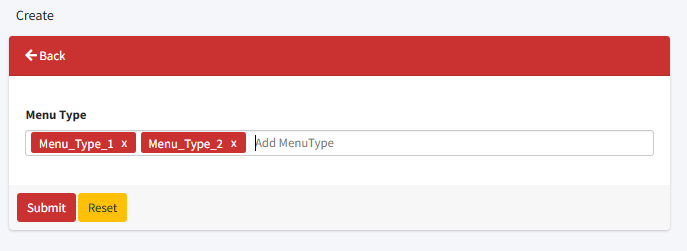
You can delete/remove any menu type from the entry field by clicking on the remove (x) icon.
Your menu types are created now and will be displayed on the screen.
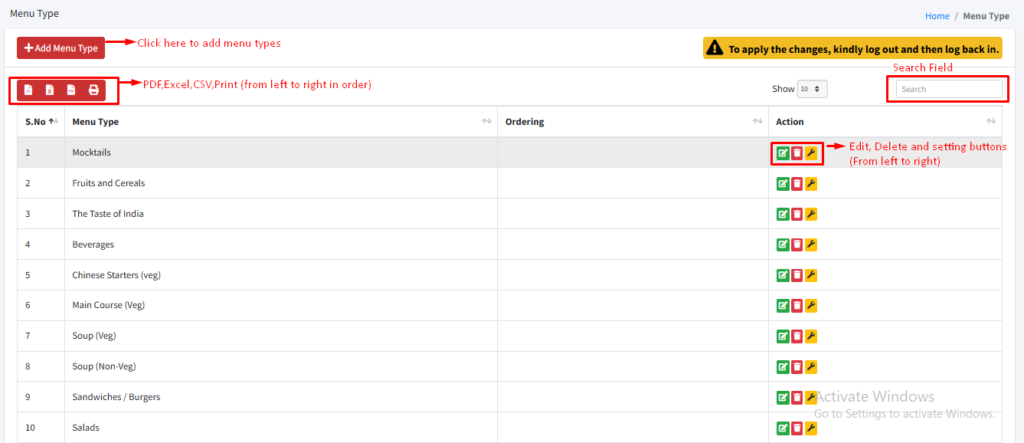
Note: You can only delete a menu type if it is empty. This means that no menu items have been assigned to that specific menu type.
Need help?
Have you any question which is not answered in this knowledge base? Contact us. We are here to help you.